
Network configuration
This screen lets you set a shared administration password for the network.
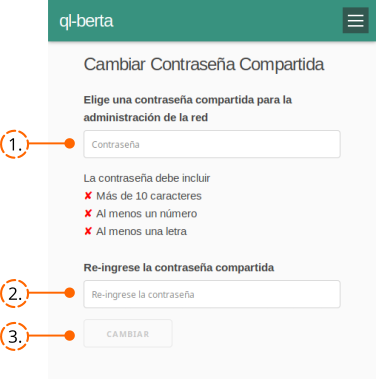
- Type the desired password. It must satisfy the three conditions shown on the screen. Each condition shows a red cross ✘ when unmet and a green tick ✔ when met.
- Repeat the same password. If the message «The passwords do not match» appears, re-type it carefully until they match.
- Press the Change button. As confirmation, the message «The shared password was successfully changed» is displayed.
WARNING
This decision should be made together with the people who administer the network. It is not a personal choice: it changes the password used to act upon the entire network.
WARNING
This is not the same as the Wi-Fi password. If you ever set them to the same value, change one of them immediately to improve the security of the node and the network.
Attribution. Translated from «Configuración de la Red» by AlterMundi, licensed under CC BY-SA 4.0.