
Status
The status screen provides basic information about the node's performance.
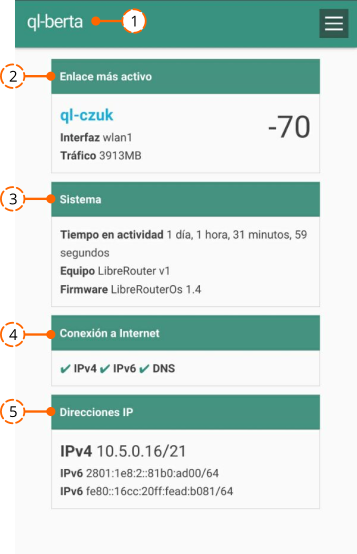
Header Shows the name of the base node and the menu icon.
Most active link Shows information about the link between the base node and the node it communicates with most directly within the network. It also indicates the interface used for this link:
wlan1orwlan2.wlan1refers to the radio/antenna labelled 1, andwlan2to the one labelled 2. Next comes the amount of data, in megabytes (MB), transferred between the two nodes since they were last interconnected (which may be a short or a long time). On the right it shows the quality of the link between the two devices — a quick way to evaluate whether the antennas of the node need to be re-oriented (see the Alignment screen).System Shows the uptime of the base node, i.e. how long it has been powered on. This information is useful to detect whether a node reboots on its own, without the network maintainers intending it to. It also reports the hardware version of the LibreRouter and the firmware version installed on it.
Internet connection Reports the following:
- IPv4 — whether there is traffic sent and received using the IPv4 address of the node, i.e. whether the node has IPv4 Internet connectivity.
- IPv6 — same as above, for IPv6.
- DNS — whether the node can reach the Domain Name System server, which maps domain names to the IP addresses that host them. A red cross ✘ means the service is unavailable; a green tick ✔ means it is working.
IP addresses The IP addresses that the base node uses to be identified inside the network. Often useful when monitoring and diagnosing the network.
Attribution. Translated from «Estado» by AlterMundi, licensed under CC BY-SA 4.0.